A sandboxed HTML viewer for people who paste a lot
Paste HTML, see it rendered in a sandboxed preview. No upload, no signup, no tracking.
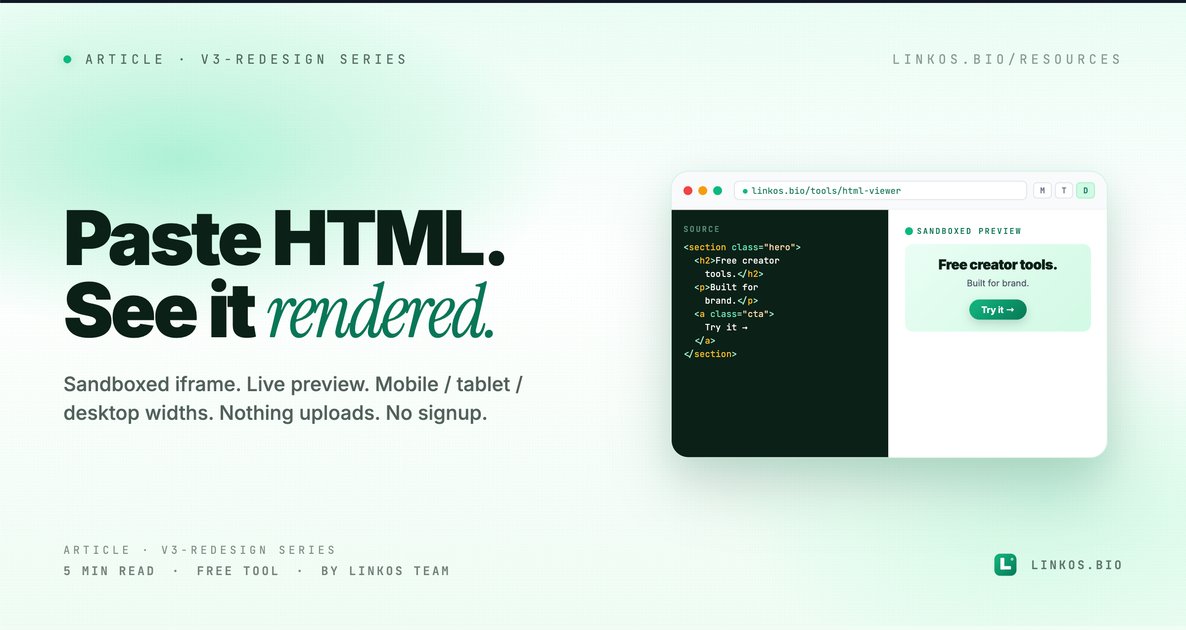
We shipped a sandboxed HTML viewer for people who paste a lot of HTML. Drop raw HTML in the editor, see it rendered in an isolated frame, no upload, no signup, no chance of the snippet running on your account.
If you just want the tool, it's at linkos.bio/tools/html-viewer.
What this tool actually does
Three things, all visible the moment you open it.
- Renders HTML in an isolated sandbox. Your pasted snippet runs inside a sandboxed iframe with no network access to your session, no cookie access, no localStorage, no parent-window message passing. Whatever's in the snippet stays in the snippet.
- Live re-render as you type. Edit the source in the left pane, the preview on the right updates within ~100ms. No save button, no refresh — instant feedback.
- View at any width. Toggle between mobile, tablet, and desktop preview widths to see how the snippet responds at different breakpoints. Useful for email templates and landing-page sections.
No login required. Nothing uploads anywhere. Everything runs in your browser, locally.
Why this tool exists
Designers and devs paste HTML into all kinds of places that aren't built to handle it: Slack DMs render half of it, Notion strips the styles, online "preview" sites embed your snippet in their own page (so styles bleed both ways), browser dev tools work but require dropping into devtools every time.
We needed something we'd actually use ourselves for previewing email templates, landing-page sections clients sent over, and AI-generated HTML snippets we were vetting before shipping. So we built it, kept it free, sandboxed it properly, and skipped the signup wall.
The 5 things that make an HTML viewer actually safe
If you only have 60 seconds, here are the patterns that separate a safe HTML preview tool from one that quietly leaks your data.
- Render in a sandboxed iframe with
sandbox=""empty. That single attribute disables forms, scripts, top-level navigation, plugins, and same-origin treatment. Whatever's in the snippet can't touch the parent window. Any tool that renders your HTML in the same DOM as their UI is leaking. - No remote fetch of pasted content. If the tool POSTs your snippet to a server before rendering, your HTML is on someone else's disk. Browser-local rendering is the only way to be sure. Linkos's viewer runs entirely in your browser.
- Strip dangerous schemes from
<a href>.javascript:anddata:URIs in links are the most common XSS vector in pasted snippets. A safe viewer strips them before rendering, or blocks navigation entirely. - No same-origin iframe contents. If the preview iframe inherits the parent's origin (via
srcdocwithoutsandbox), the snippet has access to localStorage, cookies, and parent-window APIs. Always setsandboxto a restrictive empty value or an allowlist (sandbox="allow-same-origin"is NOT safe — that's the worst case). - Show source, rendered output, AND raw text side by side. The point of a viewer is to compare what's written to what's rendered. Tools that show only one or the other miss the value entirely.
Pop quiz · 5 questions · ~60 seconds
Do you know what makes HTML preview safe?
Answer 5 multiple-choice questions. See your tier at the end. Bragging rights optional.
How to use the tool
The flow is one screen, two steps.
- Open the tool at linkos.bio/tools/html-viewer.
- Paste your HTML in the left pane. The right pane renders it live. Toggle viewport width if you want to see mobile / tablet / desktop responsive behavior.
That's it. No save, no export, no download. Close the tab when you're done — nothing persists.
Try the tool
Open the html viewer tool — free, no signup
When HTML viewer is the right tool
Use it when:
- You're previewing an email template before sending — Mailchimp's preview is fine, but a fast standalone viewer skips the login + draft creation.
- A client sent you a landing-page section as raw HTML and you want to see it without dropping it into your dev environment.
- You're vetting AI-generated HTML (ChatGPT, Claude, Cursor) before pasting into a real project.
- You want to quickly check how an HTML snippet behaves at different viewport widths.
- You're learning HTML/CSS and want a sandbox to iterate fast without setting up a project.
Skip it when:
- The snippet needs to make real network requests — sandboxed previews block those by design.
- You need a full dev experience with hot reload + module imports — use Vite + a project for that.
- The HTML is part of a larger styled context — the viewer renders it on a blank page, so anything that depends on parent styles won't reflect production.
Common questions about HTML viewer
Is my pasted HTML saved anywhere? No. Everything runs in your browser. Nothing posts to a server, nothing writes to a database, nothing's logged.
Can the snippet do anything malicious to my browser? Very little. The sandbox blocks JavaScript execution by default, blocks network requests, blocks form submission, blocks navigation to other URLs. A malicious snippet can render misleading UI inside the preview frame, but it can't touch anything outside that frame.
Does it support inline <style> and <script>? Inline <style> blocks render fine. Inline <script> blocks are blocked by the sandbox (this is intentional — see safety section above).
Can I import external stylesheets via <link>? Yes for most CDN-hosted stylesheets, no for stylesheets that require credentials. The sandboxed iframe can issue GETs to most public URLs.
How big can my HTML be? Up to 500 KB of source. Beyond that, paste the smaller meaningful chunk and iterate. Most email templates and landing pages are under 100 KB anyway.
Can I save what I'm working on? No — the tool is intentionally ephemeral. If you want persistence, copy your HTML out before closing. We're considering a "save as draft" feature for Premium Pass — message contact@linkos.bio if that's interesting.
The view-source habit
If you do a lot of HTML work, having a one-keystroke sandbox in a browser tab is the kind of small infrastructure that compounds. We use this internally for vetting AI-generated email templates before pasting into Resend, and for checking client-sent HTML before adding it to a Next.js project. Free, sandboxed, no friction.
Related resource
Download / open: link-in-bio-playbook-2026
Questions or feature requests? Email contact@linkos.bio — we read every reply.
Sign up to start earning XP for every read.
📗 Free: the Link-in-Bio Starter Kit
The checklist, 6 layout templates, and our 1-page cheat sheet — sent straight to your inbox.