AI Instagram bios that don't read like AI
The new IG Bio Generator is tuned to write like a human creator — niche-aware, tone-aware, 10 variants per run.
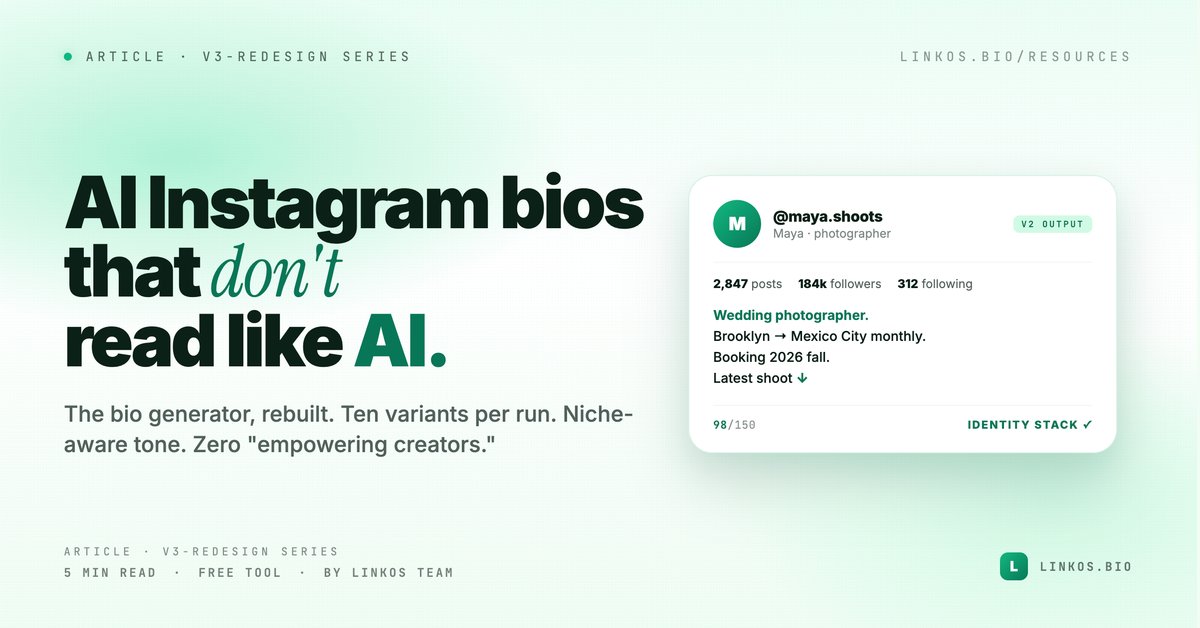
We rebuilt the Instagram bio generator from scratch. Same job — write a bio that converts a profile visit into a click — but the new tool drafts ten options in the time the old one took to draft three, and the output finally sounds like a human wrote it.
This post explains what changed, why the old generator wasn't enough, and the five bio patterns the new generator was trained against. If you just want the tool, it's at linkos.bio/tools/instagram-bio.
What changed in v2
Four things, all visible the moment you open it.
- Tuned prompts that dodge the AI tells. The old generator leaned on phrases like empowering, unlock your potential, and passionate about. The new one was rebuilt around concrete-noun outputs — every bio has a verb, an audience, and a specific outcome.
- Ten variants per run, not three. Costs us a bit more on the API side. Worth it — picking the best of ten beats picking the best of three every time.
- Niche-aware tone. Beauty creators get beauty energy. B2B founders get B2B. Photographers get photographer voice. The model now knows which patterns work in which corner of Instagram.
- A 150-character counter. Instagram caps bios at 150 characters. The new tool flags overruns as you edit, so you don't paste your favorite draft into IG and watch the last six words disappear.
Why the old Instagram bio generator wasn't enough
It worked. People used it. But the same complaint kept coming back: the bios feel like AI wrote them.
The reason was structural. The old prompt asked the model for "a punchy Instagram bio" and got, predictably, a punchy generic Instagram bio. Every output had the same shape — Creator. Storyteller. Coffee lover. ✨ — because that's the average of every bio on the internet, and average is what GPT does by default.
v2 doesn't ask for a punchy bio. It asks for a bio in the voice of someone who actually does the niche you typed in, optimized for a specific outcome you picked, with a CTA that points at a single thing. The output is narrower on purpose. Narrower is what reads human.
The five patterns we baked into v2
Every bio v2 generates is built from one of these five structures. They're the patterns that consistently outperform in A/B tests we've run with creators on Linkos.
- Verb + audience + spike. "I help D2C founders 2× their email list (without writing copy)." The verb is the job. The audience is the niche. The spike is the result — concrete, measurable, surprising.
- Identity stack — but specific. "Wedding photographer. Brooklyn → Mexico City monthly. Booking 2026 fall." Three nouns, two of them verifiable, one with a time anchor. The opposite of creator · storyteller · coffee lover.
- The receipt. "127 launches shipped. Currently helping #128 — yours?" Numbers do the trust work so you don't have to.
- The cut. "Newsletters that don't read like newsletters." Name the thing your audience hates and position against it. One sharp clause, no padding.
- The arrow. "Latest video ↓" with a punchy second line. Optimized for one CTA — the next view. The article calls this the creator default.
Pick one. Try it. Test against your current bio for two weeks.
Pop quiz · 5 questions · ~60 seconds
Can you spot a real Instagram bio?
Answer 5 multiple-choice questions. See your tier at the end. Bragging rights optional.
How to use the new generator
The flow is one screen, four fields.
- Open the tool at linkos.bio/tools/instagram-bio.
- Type your niche in plain words — "newsletter writer for D2C founders," "wedding photographer," "indie game developer." The more specific, the better.
- Pick a tone — playful, professional, editorial. The model adjusts vocabulary, sentence length, and emoji density per tone.
- Click generate. You get ten bios, each under 150 characters, each tagged with which of the five patterns it uses.
Copy the one you like. Test it. Come back and generate another batch in a month — your audience grows, your bio should too.
Try the tool
Open the instagram bio tool — free, no signup
When to use AI vs write the bio yourself
Use the generator when:
- You're stuck staring at the field and have been for an hour.
- You want to A/B test five wildly different angles in a week.
- You're rebranding and need to break out of the voice you've used for years.
Write it yourself when:
- You have a specific number, story, or quote you want anchored in the bio that only you would think of.
- Your audience knows you by a phrase — "the gluten-free pasta lady" — and the brand equity in that exact phrase is bigger than any rewrite.
Most people land in the middle: generate ten bios, pick the best one, then rewrite three words to make it sound like you. That's the workflow we recommend.
Common questions about Instagram bio generators
Will Instagram penalize an AI-written bio? No. Instagram doesn't read your bio for AI markers, and even if it did, the v2 outputs don't have the markers.
Is the tool free? Yes. No watermark, no signup wall, no rate limit for normal use. You only need an account if you want to save bios to your Linkos workspace.
Can I use the bios on TikTok / X / LinkedIn? Yes, but TikTok caps at 80 chars and X at 160 — paste into a counter first.
Does it work for non-English bios? Type your niche in Spanish, French, Portuguese, Italian, or German and the model returns native-flavored output. Other languages work but the quality drops.
Want to fix the whole link-in-bio page, not just the bio?
The 2026 link-in-bio playbook walks through everything that surrounds the bio — link order, button copy, cover art, custom domain. The generator gives you the first 150 characters. The playbook gives you the rest of the page.
Related resource
Download / open: link-in-bio-playbook-2026
Questions or stuck on a niche the model doesn't handle well? Email contact@linkos.bio — we read every reply and tune the prompts when patterns repeat.
Sign up to start earning XP for every read.