The new Link Preview — every platform, same screen
Slack, X, Facebook, iMessage, LinkedIn — see how your URL looks on all five at once. The redesigned Link Preview Tester is live.
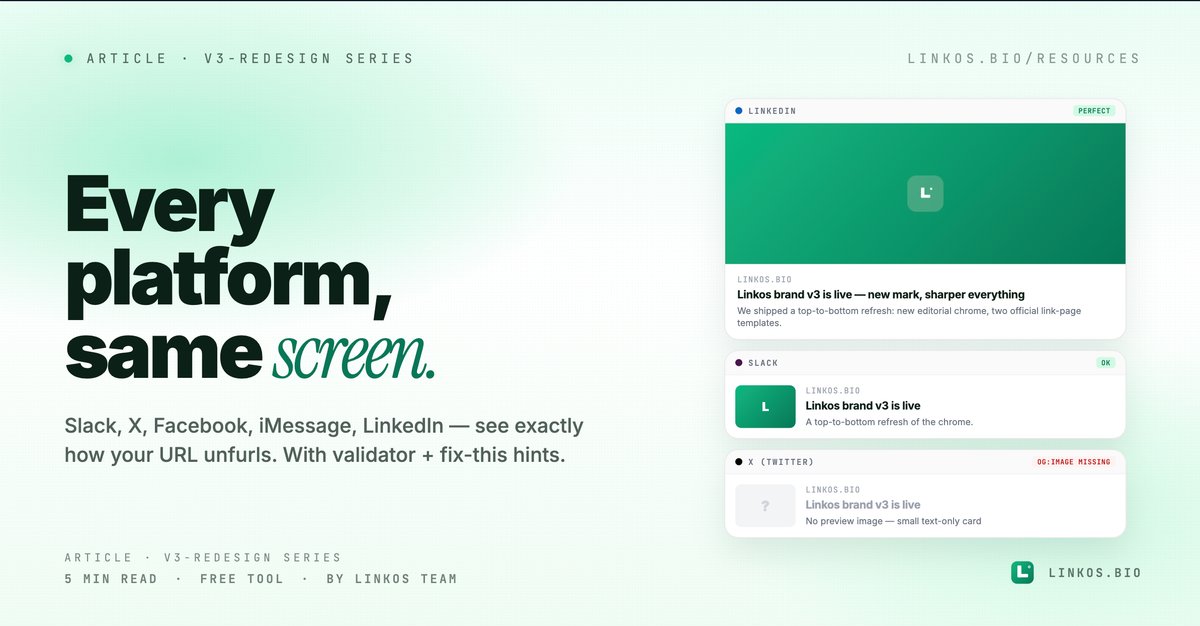
We rebuilt the Link Preview tester to show you exactly how your URL renders on Slack, X (Twitter), Facebook, iMessage, and LinkedIn — every platform, the same screen. No more guessing why your share looks broken on one network and great on another.
If you just want the tool, it's at linkos.bio/tools/link-preview.
What changed in v2
Four things, all visible the moment you open it.
- Five platforms, side by side. Slack, X, Facebook, iMessage, LinkedIn — each rendered to match how that platform's actual unfurl card looks today, not how it looked in 2019. Switching between them used to mean five tabs and a lot of pasting.
- Real-time OG validation. We fetch your page server-side, parse the OG tags, and tell you what's present, what's missing, and what's wrong (title too long for X, image too small for LinkedIn, og:image protocol-relative, etc.).
- Cached previews per URL. Once a URL is checked, the result is cached at /tools/link-preview/ — share that link with a designer or a teammate and they see exactly what you saw, without re-fetching.
- The "fix this" hints. When something's broken, we don't just flag it — we tell you the exact OG tag and value to write. "Add
<meta property=\"og:image\" content=\"https://...\">— currently missing."
Why the old tester wasn't enough
The previous version showed a generic preview card and called it done. Reality: every platform unfurls differently. Slack honors more OG tags than Twitter does. iMessage uses og:image AND apple-mobile-web-app-title AND favicon depending on context. LinkedIn has a minimum image size (1200×627) below which the card collapses to a tiny thumbnail.
Old tester showed "looks fine" when LinkedIn was actually displaying a sad single-line text snippet. v2 shows the real card for each.
The 5 OG tags every share needs (in priority order)
If you only have 60 seconds, here are the tags that make or break a link preview across every platform.
og:title— under 60 characters. Twitter truncates at 70, LinkedIn at 100, but 60 is the safe zone where nothing gets clipped on mobile. This is the headline of your share — the most important field.og:description— under 155 characters. Pre-2024 you could get away with 200+; modern unfurls truncate harder. 155 is the new ceiling that survives across all five platforms.og:image— exactly 1200×630 PNG or JPG, under 5MB, absolute HTTPS URL. Protocol-relative URLs (//cdn.x.com/img.png) silently fail on iMessage. Anything under 1200×627 collapses to a small thumbnail on LinkedIn.og:type— set towebsitefor most pages,articlefor blog posts. Some unfurls use this to pick a card style.twitter:card— set tosummary_large_imagefor the big-photo card, orsummaryfor the small-photo variant. X uses this; falls back to OG tags if missing, but explicit is safer.
og:url and og:site_name are also nice-to-haves but not gatekeepers.
Pop quiz · 5 questions · ~60 seconds
Do you know what makes a link preview good?
Answer 5 multiple-choice questions. See your tier at the end. Bragging rights optional.
How to use the tester
The flow is one screen, two steps.
- Open the tool at linkos.bio/tools/link-preview.
- Paste your URL. The tool fetches it, parses your OG tags, and shows five platform previews + a validation panel listing anything missing or malformed.
That's it. Share the resulting URL (linkos.bio/tools/link-preview/) with anyone — they see the same previews without having to re-fetch.
Try the tool
Open the link preview tool — free, no signup
When to use the tester
Use it when:
- You shipped a new landing page and want to verify the share card looks right before broadcasting.
- A teammate's link share is rendering broken and you need to diagnose which OG tag is the problem.
- You're A/B testing OG titles or images and want to compare options visually.
- You're auditing an entire site for share-card quality (run each top page through it).
Skip it when:
- You just want a generic check of "does it look OK" — opening a Slack DM to yourself is faster for casual checks.
- The page is gated by auth — the tester fetches anonymously, so behind-login pages won't render correctly.
Common questions about link previews
Why does my share look different on Twitter vs Facebook? Each platform implements OG slightly differently — Twitter prefers twitter: prefixed tags but falls back to og:, Facebook is strict about OG image dimensions, iMessage uses Apple's spec which differs from OG. Same source HTML, different downstream rendering.
Why does my image not show on LinkedIn? Most common cause: under 1200×627. LinkedIn collapses small images to a tiny inline thumbnail. Bump to 1200×630 minimum.
My OG tags are right but the preview shows the old version. Each platform caches OG previews aggressively. Slack caches ~1 hour, Twitter ~7 days, Facebook gives you their Sharing Debugger to force refresh. Linkos's tester bypasses caching — what you see is the live HTML.
Can I preview a page that's behind a login? No — the tester fetches anonymously like a real social bot would. Behind-login pages return your login screen's OG tags instead of the page's. Use a public preview URL or staging environment for testing.
Does the tester work for sites with redirects? Yes — we follow up to 5 redirect hops before giving up. If your final destination has OG tags, we'll show them.
The dynamic OG-image trick
If you're shipping content where every page needs its own OG image (blog posts, products, profiles), don't try to hand-design 200 images. Use Next.js's Image Response (which Linkos uses for every resource page) or a service like Cloudinary's URL-based generator. One template, dynamic text, perfect aspect ratio every time.
If you want a real example: every Linkos resource at /resources/<slug> has a custom OG card generated server-side from the resource's title + cover image. Try one with the tester — you'll see it renders identically on all five platforms.
Related resource
Download / open: link-in-bio-playbook-2026
Questions or stuck on a specific platform? Email contact@linkos.bio — we read every reply.
Sign up to start earning XP for every read.