From LinkedIn export to public bio — without scraping
Upload your LinkedIn data export and we turn it into a public, linkable bio. ToS-clean, your data only.
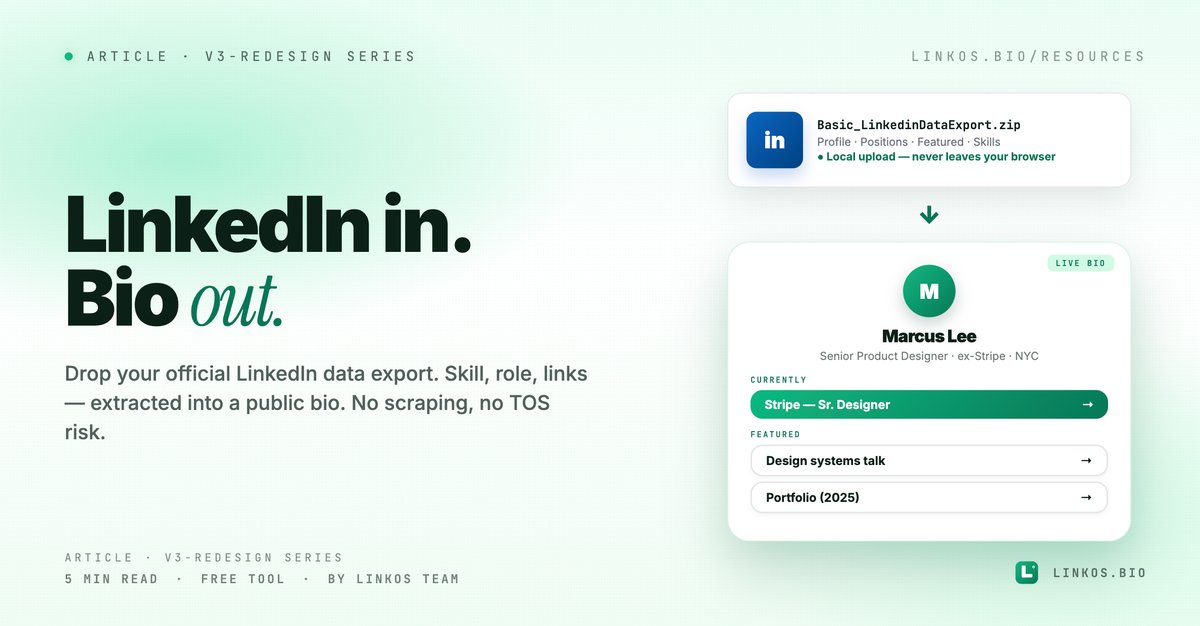
We shipped the LinkedIn-to-Bio importer for people who want a public bio page but already have all their content sitting in LinkedIn — headline, current role, links, education, skills. Upload your LinkedIn data export (the official ZIP you can request from LinkedIn anytime), and the tool extracts the relevant bits into a Linkos bio page. No scraping, no LinkedIn API, no risk of your account being flagged.
If you just want the tool, it's at linkos.bio/tools/linkedin-to-bio.
What this tool actually does
Four things, all visible the moment you open it.
- Reads your official LinkedIn data export. Request the ZIP from LinkedIn (Settings → Data privacy → Get a copy of your data → takes ~10 min to arrive). Drop the unzipped folder into the tool. Done.
- Smart field extraction. Headline becomes your bio name + tagline. Current role becomes a section. Custom links / Featured links become buttons. Skills become tags if you want them shown.
- Privacy-first. Everything runs in your browser. The export contents are NEVER uploaded to a server. The file leaves your machine only when you choose to save the resulting bio page.
- No LinkedIn API, no terms violation. Using your own exported data is explicitly allowed by LinkedIn's terms. We don't scrape, we don't poke their API, we don't keep auth tokens. Your account is safe.
This is the only LinkedIn-to-bio tool we know of that respects LinkedIn's TOS by design.
Why this tool exists
LinkedIn is the world's largest professional content repository, but the URL it gives you (linkedin.com/in/your-handle) is locked into LinkedIn's chrome. Outside of LinkedIn, you don't get to control the layout, the theme, the analytics, or what appears.
If you want a public-facing URL that shows your professional identity but doesn't require visitors to be logged into LinkedIn, you need a separate bio page. Building that from scratch when LinkedIn already has 90% of the content is wasted effort.
This tool takes that content (legally, via your data export) and turns it into a bio in 60 seconds.
The 5 LinkedIn fields that map cleanest to a bio
If you only have 60 seconds, here are the fields the tool reads + how they end up on your bio.
- Headline → bio tagline. Your LinkedIn headline ("Senior Product Designer · ex-Stripe · NYC") becomes the line under your name on the bio. Keep it specific, not generic.
- Current Position → "Currently" section. The job title + company you list as your current role becomes a labeled section near the top of the bio. Useful as a credibility anchor.
- Featured links → buttons. The "Featured" section on your LinkedIn profile (the one with thumbnail cards) — those URLs become buttons. Each link's title text becomes the button label.
- Personal website / website fields → primary CTA button. If you've set a personal website in your contact info, it becomes the top-stacked button (highest visual priority).
- Skills → optional tag row. Only shown if you opt in during import — some bios benefit from showing 5-10 skills as inline tags; others don't want them visible.
What the tool deliberately SKIPS:
- Recommendations and endorsements (too verbose for a bio surface)
- Education history (skip unless you toggle it on — most creators don't put their MBA at the top of their bio page)
- Activity feed / posts (not part of the bio's purpose)
Pop quiz · 5 questions · ~60 seconds
Will LinkedIn flag your account for using this?
Answer 5 multiple-choice questions. See your tier at the end. Bragging rights optional.
How to use the tool
The flow is one-time setup + 3 steps every time.
One-time: Request your LinkedIn data export. LinkedIn → Settings → Data privacy → Get a copy of your data → Pick "The works" or "Profile" → Submit. Wait ~10 minutes for the email.
Every time:
- Open the tool at linkos.bio/tools/linkedin-to-bio.
- Drop the unzipped ZIP folder into the upload area. Nothing transmits anywhere — everything happens locally in your browser.
- Pick what to include (Featured links: always · Skills: optional · Education: optional · Profile photo: from the photo files in the export). Click Generate.
Live preview shows the bio. Sign in to claim the URL or copy the preview link for a one-time share.
Try the tool
Open the linkedin to bio tool — free, no signup
When this is the right move
Use it when:
- You're a working professional / consultant who maintains an active LinkedIn but wants a separate public bio URL.
- You're switching from a paid bio tool and want to bootstrap from your LinkedIn instead of starting from a blank page.
- You're between jobs and want a bio page to share with recruiters / on resumes — the export captures your past roles cleanly.
- You want to make a "professional you" bio page that's distinct from a "personal/creator you" bio.
Skip it when:
- You don't actively maintain your LinkedIn (the import will surface stale content — fix LinkedIn first, then re-export).
- You're a creator whose brand identity has nothing to do with your day job.
- You don't have a LinkedIn account.
Common questions about LinkedIn-to-bio
Is this scraping? No. The tool only reads YOUR exported data, which LinkedIn provides via their official export feature. We don't touch their API, don't crawl, don't log in on your behalf. It's the same as if you opened the export ZIP in a text editor and copied content manually — just faster.
Will LinkedIn flag my account? No. Using your own data export is explicitly allowed in their TOS. The tool never communicates with LinkedIn's servers.
What about my profile photo? LinkedIn's export includes your profile picture as an image file. Drop the whole unzipped folder and the tool finds + uploads the photo automatically.
Can I re-import after updating my LinkedIn? Yes — re-export your data (or just re-upload the same export if you've already manually updated), and the tool overwrites the existing bio.
Does the import include my LinkedIn posts? No — by design. Your activity feed isn't a bio. If you want to surface specific articles you've written, those should be Featured links on LinkedIn — which DO import.
What if I don't have a LinkedIn? Use markdown-to-bio or the manual editor instead — both work great for creating a bio from scratch.
My export has years of data. How long does processing take? Under 5 seconds for most exports. The tool only reads ~10 files from the ZIP (profile, positions, featured) and ignores the bulk of the export (which is messaging history, ads-click history, etc.).
The "LinkedIn for content, Linkos for distribution" workflow
The pattern we see with professionals who use both: keep LinkedIn as the canonical professional record (you'd update it anyway), and use this tool to re-import → Linkos bio whenever your LinkedIn substantively changes (new role, new featured project). Best of both — LinkedIn's content management + Linkos's distribution surface.
Related resource
Download / open: link-in-bio-playbook-2026
Questions or stuck on a specific LinkedIn export oddity? Email contact@linkos.bio — we read every reply.
Sign up to start earning XP for every read.