Paste markdown, get a live bio page in 30 seconds
The new Markdown → Linkos Bio tool turns any markdown — README, notes, writing — into a bio page in seconds.
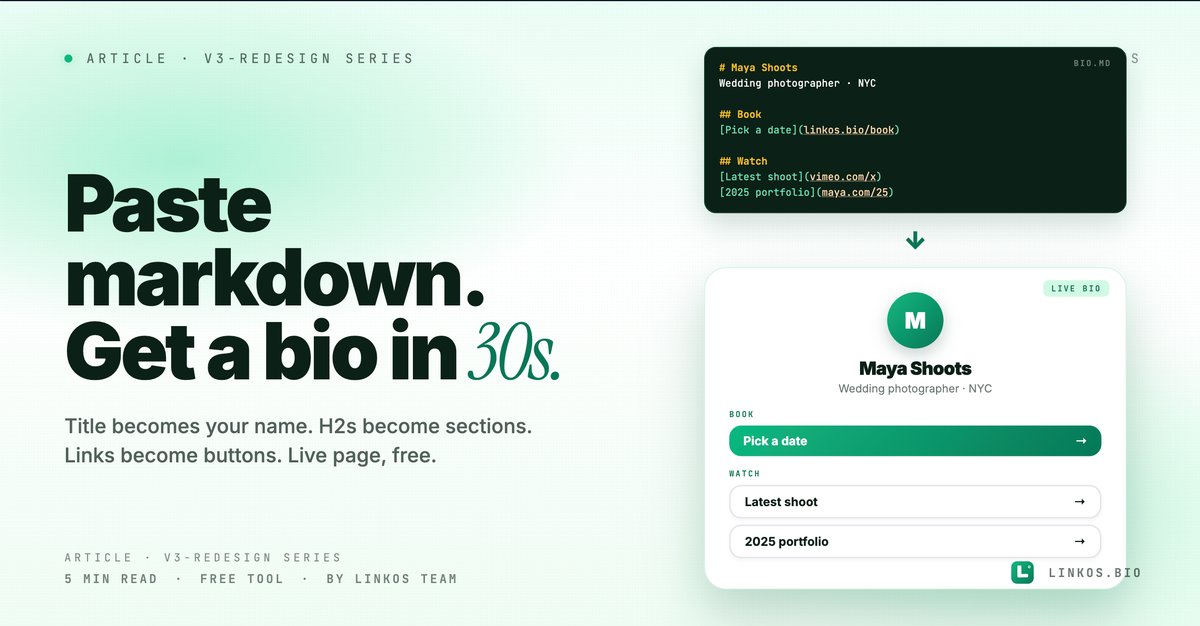
We shipped the markdown-to-bio tool we'd been wanting forever. Paste markdown — a README, a Notes app dump, your CV in plain text — and get a live Linkos bio page in 30 seconds. No drag-and-drop, no link-by-link config.
If you just want the tool, it's at linkos.bio/tools/markdown-to-bio.
What this tool actually does
Four things, all visible the moment you open it.
- Parses markdown into bio structure. Your title becomes the page headline. H2s become section labels. Links become bio buttons. Plain paragraphs become bio text. The order in your markdown = the order on the page.
- Live preview as you type. Right pane shows the bio page rendered in real time. See how the page looks before you ship it.
- 30-second from blank → published. No login wall for the preview. If you want to claim the URL + edit later, sign in at the end (free plan covers unlimited bio pages).
- Smart link extraction. Bare URLs in your markdown auto-convert to buttons. Markdown links (
[text](url)) become buttons with the link text as the button label.
This is the fastest blank → live bio flow on the internet, by a margin.
Why this tool exists
Most bio-page tools start with "click + to add a link" and expect you to manually build the whole page. That's fine for power users — slow for someone who already has their content in some other form (a notes file, a CV, a README, an LinkedIn export).
If your content already exists somewhere, you should be able to paste it once and get a page out. That's the gap this tool fills.
It's also the easiest path for non-technical users who learned markdown from GitHub or Notion — they already write headings + links naturally. The mental model maps 1-to-1.
The 5 markdown patterns that convert best
If you only have 60 seconds, here are the patterns that turn raw markdown into a bio page that doesn't need 20 minutes of cleanup.
- Start with
# Your Name(single H1). This becomes your page title. Don't use multiple H1s — the parser treats only the first as the page title, the rest get demoted to section headers. - Use
## Section Labelfor groupings. Newsletter / Latest / Shop / About — each H2 starts a new visual section on the bio page. Skip H2s if you want everything in one flat stack. - One link per line, as a markdown link.
[Get the playbook](https://...)becomes a button labeled "Get the playbook." Bare URLs work too but the link text from markdown produces cleaner buttons. - Plain prose for intro/bio text. Any paragraph that isn't a heading and doesn't contain a link gets rendered as bio text — useful for a 1-line intro under your name or a short blurb between sections.
- Skip nested lists. Bullet lists with links inside are valid markdown but the tool renders the links as separate buttons + drops the list structure. Cleaner: put each link on its own line as a top-level markdown link.
Pop quiz · 5 questions · ~60 seconds
Are you writing markdown that converts cleanly to a bio?
Answer 5 multiple-choice questions. See your tier at the end. Bragging rights optional.
How to use the tool
The flow is one screen, three steps.
- Open the tool at linkos.bio/tools/markdown-to-bio.
- Paste your markdown in the left editor. Use the patterns above for cleanest output.
- Hit Generate. The right pane shows your live bio page. If you like it, sign in (or stay anonymous for a temporary preview link).
That's it. Most jobs take under 30 seconds from "I should have a bio page" to "here's my URL."
Try the tool
Open the markdown to bio tool — free, no signup
When to use this vs starting from scratch
Use markdown-to-bio when:
- Your content already exists somewhere as markdown (README, notes, CV file, Substack export).
- You want a working draft in under a minute that you'll refine later in the editor.
- You're rebuilding a bio after an account migration or rebrand.
- You're helping a non-technical friend ship a page — markdown is way easier to explain than "click + add link, then drag to reorder."
Start from scratch in the editor when:
- You want pixel-level control from the start (custom button colors, specific theme, embedded media).
- Your bio page needs features markdown doesn't express (video embeds, contact forms, gated content).
- You're under 5 links and 1 intro — the manual editor is faster for tiny pages.
Common questions about markdown-to-bio
Does it preserve images? Inline image markdown () renders as a banner-style image on the bio page. Local image upload isn't supported via paste — upload them in the editor afterward.
What about embeds (YouTube, Spotify, Twitter)? Not in v1 — paste the URL as a link and it'll become a button. We're adding inline embed parsing in v1.1.
Can I paste a Notion page? Export the Notion page as Markdown (Notion → File → Export → Markdown), then paste the result. Works well — Notion's markdown output is clean.
What if my markdown has a YAML frontmatter block? It's stripped — only the body content gets parsed. So title: in frontmatter doesn't become the page title; use a top H1 (# Title) for that.
Can I edit the page after generating? Yes — sign in at the end and the page becomes a normal Linkos bio you can edit, theme, customize, etc. The markdown paste is just the import step.
Will my markdown be saved anywhere? Only if you sign in + save. Anonymous preview URLs are deleted after 24 hours of inactivity.
The "I already have my content somewhere" angle
This tool is most valuable to people who didn't realize their existing content was 90% of a bio page already:
- A README on a personal GitHub repo
- A Substack about page
- A notes file with link drops
- An export from another link-in-bio tool (Linktree's CSV export, for example, can be reshaped to markdown in 2 minutes)
If you've been putting off the "build a proper bio page" project, the input cost just dropped to "paste and click."
Related resource
Download / open: link-in-bio-playbook-2026
Questions or stuck on a specific markdown pattern? Email contact@linkos.bio — we read every reply.
Sign up to start earning XP for every read.