Turn any public Notion page into a Linkos bio
Paste a public Notion URL — we extract title, intro, and every link into a Linkos bio in seconds.
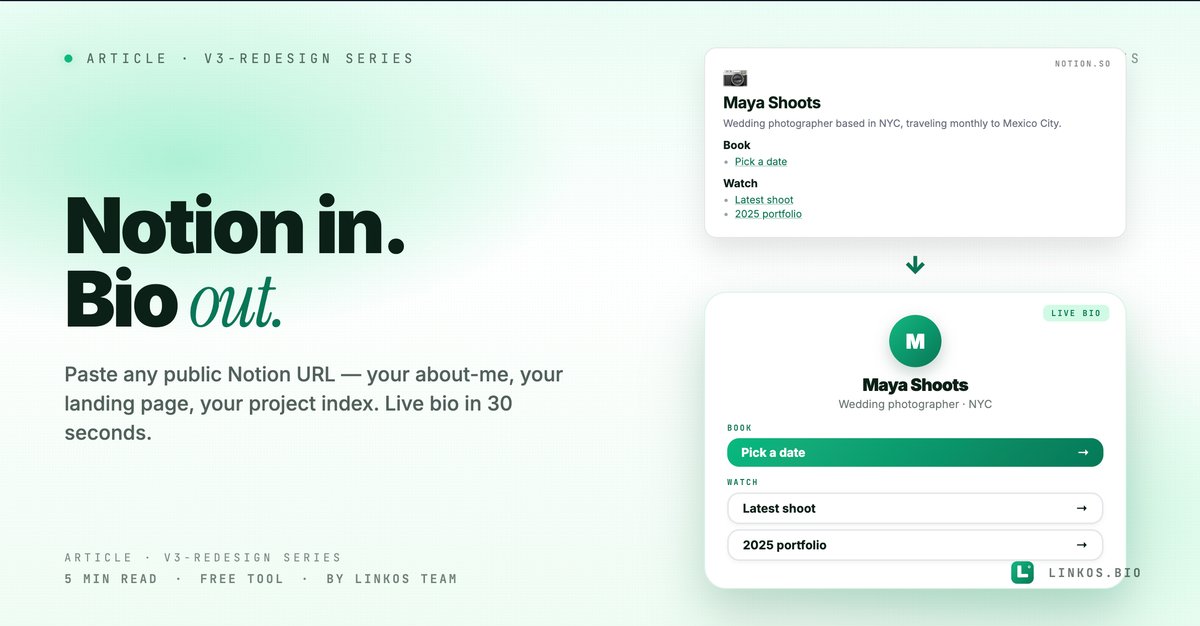
We shipped the Notion-to-Bio tool we'd been wanting for years. Paste any public Notion page URL — your "about me" doc, a personal landing page, a project index — and the tool extracts your title, intro, and every link into a live Linkos bio page. 30 seconds, no copy/paste.
If you just want the tool, it's at linkos.bio/tools/notion-to-bio.
What this tool actually does
Four things, all visible the moment you open it.
- Reads public Notion pages directly. Paste the share URL (the one that ends in
/Your-Page-Title-xxxx), the tool fetches it server-side, parses the structure, and surfaces the content. - Smart extraction. Your page title becomes the bio headline. Top-of-page text becomes the bio intro. Every link in the page becomes a button on the bio. The order on Notion is preserved on the bio.
- Live preview before claiming. Right pane shows your rendered bio page before you sign in. Preview anonymously — claim the URL only if you like what you see.
- One-click claim + edit. Sign in at the end, the page becomes a normal Linkos bio you can theme, customize, and re-edit. Future updates to your Notion page do NOT sync — it's a one-time import.
This is the fastest "I have a Notion about-me page, I want it as a bio URL" flow that exists.
Why this tool exists
A surprising number of people already have a perfectly good "about me" page in Notion — they just don't share it because the URL looks ugly (notion.so/My-Page-3a5f7c...) and the page isn't optimized for mobile bio-style browsing.
You could screenshot the Notion page and re-create it in any bio tool, but that's 20 minutes of work per page. Or you could keep handing out the ugly Notion URL. Neither is great.
This tool collapses the gap. Notion stays your source of truth for the content; Linkos becomes the public-facing URL.
The 5 Notion patterns that import cleanest
If you only have 60 seconds, here are the patterns that turn a Notion page into a bio that doesn't need 20 minutes of cleanup.
- Make sure the page is set to "Share to web" + Public access. Settings → Share → Publish to web. Without this the tool can't fetch the page (you'll get a 404).
- Use the page title as your name/brand. Notion's page title (the big heading at the top) becomes your bio's name. Make it your name, your handle, or your brand — not "About me" or "Welcome to my page."
- One link per line, as a Notion link block or inline link. Both work. The cleanest source is a bulleted list of inline links — each link becomes a button labeled with the link text.
- Keep the first paragraph short — it's your bio intro. The first paragraph above any heading becomes the bio's intro text under your name. Keep it to one sentence; if you want a longer bio, use H2s to break it into sections.
- H2 headings become section labels. Newsletter / Latest / Shop / Speaking — each H2 becomes a section header on the bio. Match how you want the bio organized, not how Notion's outline is set up.
Pop quiz · 5 questions · ~60 seconds
Will your Notion page import cleanly?
Answer 5 multiple-choice questions. See your tier at the end. Bragging rights optional.
How to use the tool
The flow is one screen, three steps.
- Get your Notion page's public URL. In Notion: Share → Publish to web → Copy web link.
- Open the tool at linkos.bio/tools/notion-to-bio and paste the URL.
- Click Import. The preview renders. Sign in to claim the URL or just grab the preview link for a one-time share.
That's it. Most jobs take under a minute from "I have this Notion page" to a live bio URL.
Try the tool
Open the notion to bio tool — free, no signup
When this tool is the right move
Use it when:
- You already maintain an "about me" page in Notion for your team or personal brand.
- You want a public bio URL but the Notion URL feels too long / branded-Notion.
- You're testing a personal landing page concept before committing to building one from scratch.
- You're helping a non-technical friend get a bio page — they probably already have something in Notion.
Skip it when:
- You don't have a Notion page yet — use the markdown-to-bio tool or just build from scratch in the editor; pasting into the Notion-importer first is unnecessary friction.
- Your Notion page is heavy on embeds (videos, calendars, databases) — the importer extracts the linkable content, not the embedded widgets.
- You want live sync from Notion → bio page (not supported — it's a one-time import).
Common questions about Notion-to-bio
Will updates to my Notion page sync to the bio? No — it's a one-time import. After import, your bio page is independent. To re-sync, re-paste the Notion URL and overwrite the existing bio (we'll add an "update from source" button in v1.1).
What if my Notion page has a database (table)? The tool ignores databases for now. Convert important rows to a bulleted list of links + text before importing.
Can I import a private Notion page? No — only public-shared pages. The tool fetches anonymously, like any search engine bot would. Make the page public, import, then make it private again if you want.
What about images on the Notion page? The first image (often your avatar/cover) is extracted as your bio avatar. Inline images further down aren't carried over — Notion's image URLs expire over time, so we don't store stale references.
What about subpages? Only the top-level page imports. If your Notion page links to subpages, those links become buttons on the bio that point back to the subpage URL — they don't get imported themselves.
Does this work with Notion's new sites feature? Yes — Notion Sites pages are just published Notion pages with a custom domain. The tool reads them the same way.
The "Notion content, Linkos URL" workflow
The smartest pattern we see: keep your About Me / personal landing content in Notion (where it's easy to edit) but ship a Linkos bio URL as your public-facing identity. When you update your Notion page substantially, re-import via this tool to refresh the bio.
You get Notion's editing experience + Linkos's distribution surface (custom domain, analytics, themes, mobile-optimized rendering). Best of both.
Related resource
Download / open: link-in-bio-playbook-2026
Questions or stuck on a specific Notion structure? Email contact@linkos.bio — we read every reply.
Sign up to start earning XP for every read.