Templates redesigned — emerald, editorial, instant
The /templates gallery just got brand v3 treatment. New niche grid, phone-frame previews, one-click apply.
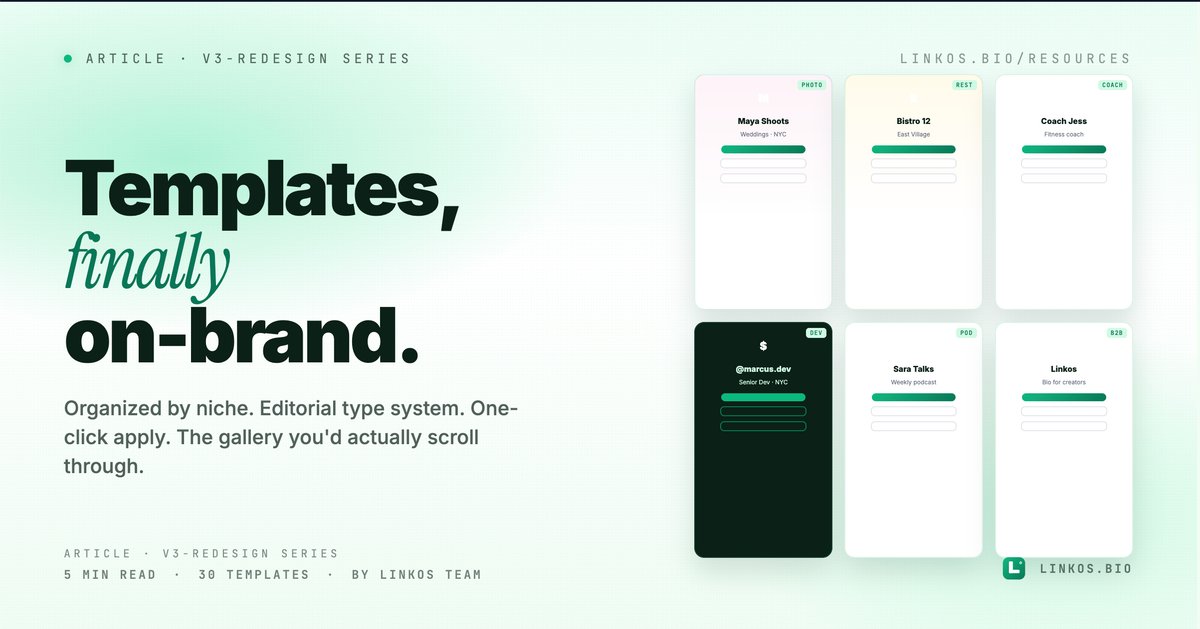
We rebuilt the templates gallery from scratch as part of brand v3. Same idea — pick a starting point for your bio page — but the new gallery is organized by who you are (photographer, restaurant, coach, dev, etc.), every template is on-brand by default, and applying one is a single click. No more scrolling through 87 generic templates hoping one fits.
If you just want the gallery, it's at linkos.bio/templates.
What changed in v3
Four things, all visible the moment you open it.
- Organized by niche, not by feature. The old gallery sorted templates by "minimal / colorful / dark mode" — useless when what you actually want is "what does a photographer's bio look like." v3 sorts by niche: photographer, restaurant, coach, dev, real estate, creator, e-commerce, podcast, fitness, beauty, b2b.
- Editorial styling on every template. Every v3 template uses the same type system — Instrument Serif display, Inter body, JetBrains Mono for metadata. They feel like a coherent product line, not a stock-photo grab bag.
- One-click apply with preview. Click any template, see your existing content (links, avatar, name) rendered in that template's style instantly. If it looks right, apply. If not, hit back, try another. Switching template = zero data loss.
- Mobile preview in the gallery itself. The thumbnail you see in the grid is already the mobile preview — what visitors will actually see. No more "templates that looked good on desktop and broke on phone."
Why the old gallery wasn't enough
The old gallery had ~80 templates organized by visual style. That sounds like a lot, but in practice every template needed manual color theming to look like YOUR brand, the previews were stock-photo desktop layouts (not what visitors saw on mobile), and applying one risked breaking your existing link order if the template's section structure was different.
v3 collapses all of that. Fewer templates (~30, growing monthly), all on-brand, niche-first organization, lossless apply.
The 5 things that make a template actually useful for your bio
If you only have 60 seconds, here are the patterns that separate a template that lives long-term on your page from one you abandon after a week.
- It matches your niche by default, not after custom theming. A wedding-photographer template should look like a wedding photographer's bio out of the box. If you need to recolor + rewrite half the example copy to make it look right, the template was wrong for you.
- It uses YOUR content as the preview. Templates that show fake names and lorem ipsum tell you nothing about whether your actual links + bio will look good. v3's preview swaps in your existing data so you see your bio in that template.
- It works at every viewport. Templates that look stunning at 1440px and break at 375px are useless — over 80% of bio-link clicks come from mobile. Always preview mobile-first.
- It supports the link types you actually use. If your bio is mostly outbound shop links + a newsletter signup, you don't need a template optimized for video embeds. Pick by use case, not by aesthetic.
- Switching costs are zero. A good template system lets you try 5 templates in 5 minutes. If applying a template overwrites your links or your custom theme, the template system is hostile to experimentation.
Pop quiz · 5 questions · ~60 seconds
Do you know how to pick a template that works?
Answer 5 multiple-choice questions. See your tier at the end. Bragging rights optional.
How to use the new gallery
The flow is one screen, three steps.
- Open the gallery at linkos.bio/templates.
- Filter by your niche. Photographer, restaurant, coach, dev, creator, real estate, e-commerce, podcast, fitness, beauty, b2b. Skip to your row, browse 3-5 templates relevant to you.
- Click any template to apply — your existing content (links, avatar, name) renders in the new style instantly. If it looks right, hit Apply. Your bio is live in the new template.
That's it. Switching costs are zero — try as many as you want.
The 11 niches v3 ships with
- Photographer — portfolio-first, big imagery
- Restaurant — menu links, reservations, location prominently visible
- Coach — booking CTA dominant, social proof prominent
- Dev — terminal aesthetic, GitHub + docs links structured
- Creator — latest content front and center, social handles secondary
- Real estate — listings, contact, neighborhood guides
- E-commerce — product cards, shop nav, deals
- Podcast — latest episode, subscribe links, host bio
- Fitness — programs, schedule, trial CTA
- Beauty — booking, products, before/after gallery
- B2B — case studies, demo CTA, social proof banner
Each niche has 2-4 template variants — different vibes within the same use case.
When to use a template vs build from scratch
Use a template when:
- You're starting fresh and want a working bio in under 5 minutes.
- You're switching niches (career pivot, rebrand) and want a structural reset.
- You like your content but the visual feels stale — swap templates without losing data.
Build from scratch when:
- Your bio has unique requirements no template covers (custom embeds, specific brand colors that don't match any preset).
- You're a designer and want pixel control from the first click.
- You're testing template ideas YOU'LL contribute back to the gallery (drop us a line if so).
Common questions about the templates gallery
Will applying a new template overwrite my links? No — links are content, templates are style. Your existing links carry over to the new template's slots automatically.
Can I customize a template after applying? Yes — every template is a starting point, not a constraint. After applying, the editor lets you change colors, fonts, layout, anything.
How often do new templates ship? Monthly. We add ~2-3 new templates per month, focused on niches that are underserved.
Can I request a niche that's not listed? Yes — message contact@linkos.bio with what you'd want to see. We're prioritizing the next 3 niches based on what comes in.
Are templates free? Standard tier — yes, every v3 template is free. Premium templates with advanced features (custom embeds, multi-section layouts) are Pro-tier and ship Q1 2027.
Related resource
Download / open: link-in-bio-playbook-2026
Questions or stuck deciding which template fits your niche? Email contact@linkos.bio — happy to recommend based on your link types.
Sign up to start earning XP for every read.
📗 Free: the Link-in-Bio Starter Kit
The checklist, 6 layout templates, and our 1-page cheat sheet — sent straight to your inbox.