Save your best threads from the algorithm
Paste a tweet URL or thread text — we render it as a permanent Linkos blog post with a clean permalink.
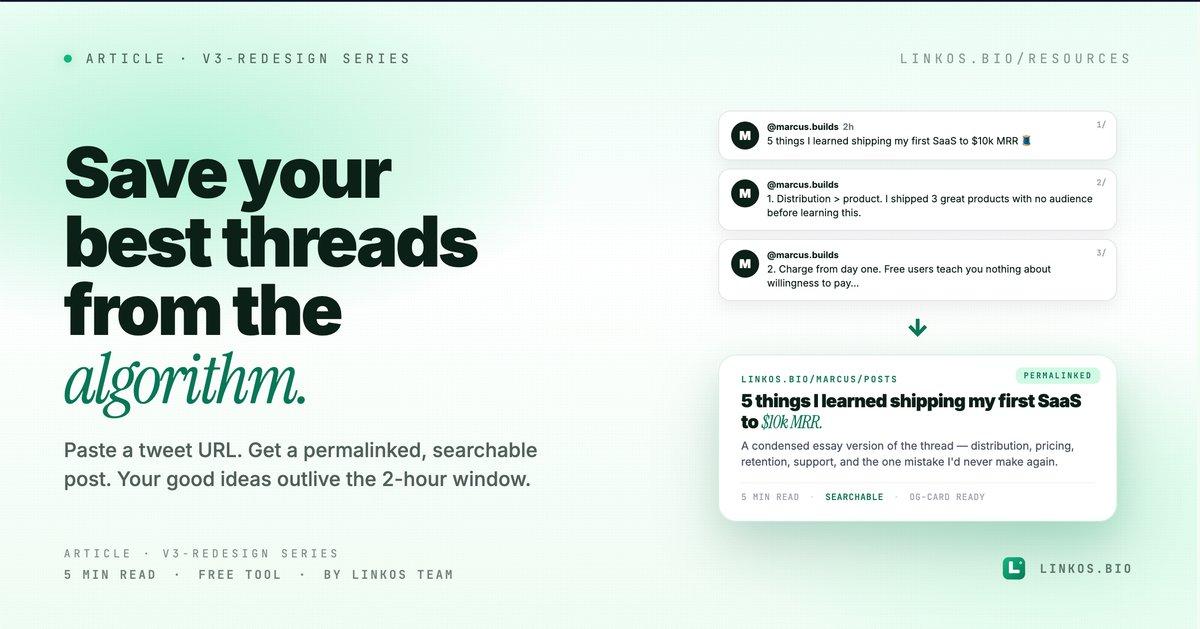
We shipped the thread-to-post tool so your best X (Twitter) threads stop dying in the timeline. Paste a tweet URL or the raw thread text, and the tool stitches it into a clean Linkos blog post — permalinked, searchable, embed-friendly. Your good ideas finally have a home that isn't a 2-hour engagement window.
If you just want the tool, it's at linkos.bio/tools/thread-to-post.
What this tool actually does
Four things, all visible the moment you open it.
- Reads X threads via public URLs. Paste any tweet URL, the tool walks the reply chain (if it's a thread by the same author) and assembles the full thread in order. No login required.
- Preserves text + media. Embedded images and short videos carry over. Links are kept inline. Quote tweets become quote blocks in the post.
- One-click publish to your Linkos blog. Each thread becomes a post at
linkos.bio/<you>/posts/<slug>— permanent URL, OG-card-ready, searchable. - Edit before publishing. Live editor between import and publish — fix typos, add a TL;DR, change the title. Once published, edits are stored as revisions you can roll back.
This is the easiest "save my best thread" workflow on the internet — built for people who tweet good stuff and want it to outlive the algorithm.
Why this tool exists
X (and Twitter before it) has the same problem every social platform has: your best content has a 2-hour viral window, then it sinks into your profile feed where no one will ever scroll deep enough to find it. The 12 most insightful threads you've ever written are buried under 800 single-line replies.
You can ask people to bookmark threads. They won't. You can pin them — but only one at a time. You can convert to a blog post manually — that's 20 minutes of copy/paste per thread.
This tool takes the friction to zero. Paste URL → publish. Now your good thread lives at a real URL forever.
The 5 patterns that make a thread worth saving
If you only have 60 seconds, here are the signals that a thread deserves to become a permanent post.
- You'd write it as an essay if you had more time. Threads that started as "here's a thing I'm thinking about" and went 12 tweets deep — those are essays in disguise. Save them.
- It's gotten saved/bookmarked more than ~50 times. Public bookmark count is a hint that the thread is worth re-reading. The bookmark-saver is the future-reader. Make it findable.
- It contains a numbered list or a step-by-step. "5 things I learned shipping X" / "How I went from 0 to 10k followers" — list-format threads are the easiest to re-find as posts.
- You keep getting asked for the link in DMs. If you've sent the same thread URL more than 3 times, it deserves a permanent home.
- It explains something you'll reference yourself. Your own future self is one of the highest-value audiences for an essay. If the thread is something you'd want to re-share next quarter, post it.
What NOT to save: hot takes that aged poorly, reply threads where most context is in the parent, jokes that depend on the timing.
Pop quiz · 5 questions · ~60 seconds
Is your thread worth saving from the algorithm?
Answer 5 multiple-choice questions. See your tier at the end. Bragging rights optional.
How to use the tool
The flow is one screen, three steps.
- Find the URL of any tweet in the thread. Doesn't have to be the first — the tool walks both directions.
- Open the tool at linkos.bio/tools/thread-to-post and paste the URL.
- Edit if needed. Live editor pre-fills the post with the thread content. Add a title, write a TL;DR, fix typos. Publish.
The resulting post lives at linkos.bio/<you>/posts/<slug> — permanent, searchable, OG-card ready for re-sharing on other platforms.
Try the tool
Open the thread to post tool — free, no signup
When this is the right move
Use it when:
- You wrote a thread that's getting more attention than your one-liners — save it before the timeline buries it.
- People keep asking you to link to a thread you posted weeks/months ago.
- You're considering a newsletter or blog but don't want to commit to a full publishing platform yet — let your best threads stack up as posts first.
- You want to embed a thread in another article or landing page (the resulting post URL embeds cleanly; the original X embed breaks if X changes its embed spec).
Skip it when:
- The thread depends on real-time context that won't translate (news reactions, beef, in-the-moment hot takes).
- It's a single tweet — those are fine as bookmarks, no need to convert.
- The thread is mostly screenshots of other people's content (re-publishing without context is weird; quote-link instead).
Common questions about thread-to-post
Does this delete my original tweet? No — the original stays on X. The tool only READS the thread; it doesn't edit or delete anything on X's side.
What about retweets / quote tweets within the thread? Retweets are skipped (they're not your content). Quote tweets become quote blocks in the post with attribution to the original author.
Will the post update if I edit the original tweet? No — it's a one-time import. Edits to the original X thread don't sync to the published post. Re-import if you want a fresh version.
Can I import other people's threads? Technically yes — the tool reads any public thread. But please don't publish someone else's content without permission. It's a TOS gray area on X and a hard "no" on basic ethics.
Does the post have its own analytics? Yes — every post gets view + share tracking at /dbz/growth/content (where you can see which posts pull traffic).
What about thread replies from other people? Only the thread author's own tweets are imported. Replies from others are skipped (would clutter the post and create attribution issues).
Can I add a custom intro before the imported content? Yes — the editor shows the imported text in the body, with a separate "title" and "TL;DR" field above. Use TL;DR for the new framing.
The "let the algorithm forget — the URL remembers" workflow
The pattern we see with creators who tweet a lot: write threads on X for the immediate-attention layer, then convert the best ones (the 1 in 20 that gets bookmarked heavily) into posts every couple of weeks. Three months in, you've got a small archive of your best ideas at permanent URLs — searchable, embeddable, share-able outside the algorithm.
The 19 worst threads of the month die quietly. The 1 best one lives forever.
Related resource
Download / open: link-in-bio-playbook-2026
Questions or stuck on a specific thread format? Email contact@linkos.bio — we read every reply.
Sign up to start earning XP for every read.