The encrypted-cloud playbook: who can actually read your files in 2026
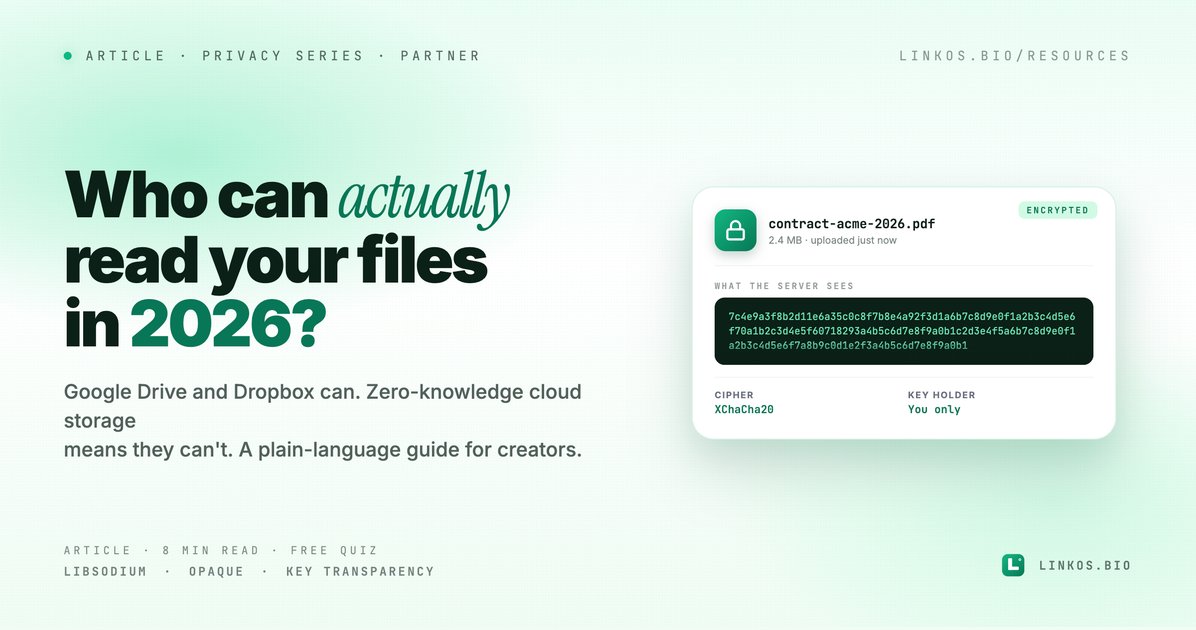
Google Drive and Dropbox can technically read your files. Zero-knowledge cloud storage (like Vault Desk) means they can't. A plain-language guide for creators in 2026.
The encrypted-cloud playbook
Who can actually read your files in 2026
You upload a draft. A signed contract. A passport scan. A 3 AM voice memo about an idea you don't want stolen. You assume nobody on the receiving end is reading it.
For most cloud storage services in 2026 — Google Drive, Dropbox, iCloud, OneDrive — that assumption is wrong by design.
Their servers store your files in plaintext, or with encryption keys their own systems hold. Three things follow from this:
- An internal employee with the right access can technically read your content. Most don't. Some do — there are documented cases at every major provider.
- A court order or government request can force the provider to hand over your decrypted files. They comply because they have the keys.
- A database breach exposes everything in usable form, not as encrypted blobs.
This isn't conspiracy stuff. It's the explicit security model your provider publishes. If you've never read it — open Google's Drive Security page and search for "we encrypt your files." You'll find it. Then search for "we encrypt your files using keys you control." You won't.
Zero-knowledge cloud storage is the alternative.
What "zero-knowledge" actually means
The term is precise, not marketing:
Zero-knowledge means the provider has zero knowledge of your file contents. Encryption happens entirely on your device. The encrypted blob ships to the server. The server cannot decrypt it — not because they promise not to, but because they don't hold a key that works.
For this to be real, three things have to be true:
- Files are encrypted before they leave your device. Not "in transit" (HTTPS does that). Not "at rest" (most providers do that). Before they leave your device. The server only ever receives ciphertext.
- Your password never reaches the server. Even hashed. Modern zero-knowledge systems use protocols like OPAQUE (RFC 9807) where the server can verify you know your password without ever seeing it.
- The key to decrypt your files is derived from your password locally. Lose your password without a recovery key, and even the provider can't recover your files. That's the trade-off — and it's the point.
If a provider tells you they "use encryption" but they can also "reset your password and get you back in," then they hold a key that decrypts your files. That's not zero-knowledge. That's just "we encrypt at rest." Big difference.
Why this matters specifically for creators
A creator's hard drive is full of leverage points:
- Unsigned contracts you're negotiating with brands
- Unreleased work — photos, drafts, recordings
- Source files for content other people would pay to copy
- Subscriber lists, financial records, tax docs
- Client work under NDA
Most of this isn't sensitive at "national security" level. It's sensitive at career level. A leaked draft kills a launch. A leaked contract burns a brand relationship. A leaked photo can cost an entire account.
You're not the target of a state-level actor. You're the unintended collateral when something else goes wrong upstream — an employee with access scrolls through your folder, a misconfigured database gets indexed, a phishing attack hands an attacker your provider's admin panel.
Zero-knowledge removes the upstream risk entirely. There's nothing meaningful to leak from a server that holds only encrypted blobs.
How to evaluate any storage provider
Five questions. Run them on whatever you use today.
1. Where do encryption keys live?
Look for the answer in the provider's security documentation. The correct zero-knowledge answer is: "on your device, derived from your password." The wrong answers include "in our HSM," "managed by us," or any variation of "we hold the keys so we can help you recover them."
2. Can the provider read your files?
This sounds like a trick question. It's not. Most providers publish this directly. Google: "Yes, our systems can access your files for indexing, AI features, and abuse detection." Dropbox: "Yes, for sync and abuse detection." iCloud: depends on whether you've enabled "Advanced Data Protection" (which is off by default).
If the answer is "yes, our systems can read them," the provider can be compelled to give those files to a third party.
3. What happens if they get breached?
Walk through the worst case. Their entire database is dumped on a leak site. What do attackers get?
- Plaintext provider: every file, readable
- At-rest encryption only: every file, readable (because the keys are stored next to the data)
- Zero-knowledge: encrypted blobs, useless without your password
4. What's their account recovery flow?
If you forget your password, can you click "Reset password" and get back into your files? If yes, they hold a key that decrypts your files. (How else would the reset work?)
True zero-knowledge providers offer a one-time recovery key at signup. You save it offline. Lose your password without that key and your files are gone — including from them. That's the trade-off of real privacy.
5. Is the crypto auditable?
The encryption code should be open source, or at least independently audited. Look for mentions of libsodium, OPAQUE, or Key Transparency in the security docs. These are the building blocks the security community has converged on — not because they're trendy, but because they've survived years of public review.
A worked example: how Vault Desk does it
We've been using Vault Desk — vaultdesk.io for the past few months at Linkos for exactly this — contracts, financial records, files we don't want sitting on a provider with a key. It's the cleanest implementation of zero-knowledge cloud storage we've seen, and Vault Desk is built by an independent Greek team rather than a US-based cloud giant, which itself is a useful diversification of risk.
Here's how it answers the five questions above:
- Where do keys live? On your device. Derived from your password via Argon2id.
- Can they read your files? No. Files are encrypted with XChaCha20-Poly1305 in your browser before upload. The server gets ciphertext.
- What happens if they're breached? Database dump = encrypted blobs + wrapped keys. Useless without your password.
- Account recovery? You're issued a one-time recovery key at signup. Save it somewhere offline. Lose your password without it and your files are unrecoverable — including by Vault Desk.
- Auditable? Yes — built on libsodium (the standard), OPAQUE (RFC 9807), and Key Transparency.
The Vault Desk 5GB free tier is enough to test it with a few real files. Paid tiers start at $4/month for 250GB.
Try Vault Desk free at vaultdesk.io →
(Full disclosure: we don't earn revenue from Vault Desk signups. We're including them because the alternatives we've tested don't measure up.)
Is Vault Desk legit? Quick FAQ
Is Vault Desk safe? Yes — Vault Desk's encryption happens client-side using libsodium (the gold-standard crypto library), OPAQUE for password authentication (RFC 9807), and Argon2id for key derivation. A server breach reveals only encrypted blobs.
Is Vault Desk free? Yes — the free tier gives you 5GB of encrypted storage forever, with the same end-to-end encryption as paid plans. Paid tiers ($4/mo for 250GB, $15/mo for 1TB) add storage but not stronger encryption — it's already maxed.
Where is Vault Desk based? Greece. The company is independent and not part of any US cloud provider. For users worried about US Cloud Act compliance affecting their data, this matters.
Can I share files with non-Vault-Desk users? Yes — Vault Desk supports public links where the decryption key lives in the URL fragment (after the #) and never reaches the server. Add a password and an expiry for extra control.
What happens if I forget my password? You get a one-time recovery key at signup. Save it offline. Without that key, your files are unrecoverable — by you OR by Vault Desk. That's the trade-off of real zero-knowledge.
What about the trade-offs?
Zero-knowledge isn't free. There are real costs you should accept going in:
No "preview in browser" for arbitrary file types. The server can't render a thumbnail of an image it can't decrypt. Some zero-knowledge providers do client-side previews (slower, but private). Others just show file icons.
No server-side search across file contents. The server can search filenames (if those aren't encrypted) but not the inside of documents. Search lives on your device, against files you've decrypted.
Account recovery is your responsibility. Lose the recovery key AND forget your password, and the files are gone. There's no support ticket that gets you back in.
Sharing requires more steps. A "share with anyone via link" still works — the decryption key lives in the URL fragment (after the #), which never reaches the server. But you can't share via an email-only flow where the recipient doesn't get a key.
These are conscious trade-offs. If they're dealbreakers for your workflow, zero-knowledge isn't right for you. For everything sensitive enough to worry about, it is.
What to do today
Pick three files on your current cloud storage that you'd genuinely not want to leak. A contract. A financial document. Something personal.
Move just those three to a zero-knowledge provider. Keep the rest where they are. You don't need to migrate everything at once.
After a week, ask yourself two questions:
- Did the friction of decrypting them on each access cost you anything meaningful?
- Does it feel different knowing those specific files are unreadable by anyone but you?
If the answer to #1 is "no" and #2 is "yes" — migrate more.
If the answer to #1 is "yes" — you've learned something useful about the cost of privacy, and you can be selective about which files actually need this level of protection.
Try the alternative: Vault Desk at vaultdesk.io — zero-knowledge cloud storage, 5GB free, built on libsodium + OPAQUE + Key Transparency.
Free tool: turn your own docs into clean PDFs locally
Speaking of file handling — if you've got Markdown notes, briefs, or lead-magnet drafts you want as professional PDFs without uploading to a third-party converter, we built a free one. Render happens in your browser; we never see the file.
Try the tool
Open the markdown to pdf tool — free, no signup
More on owning your online presence
Encrypted storage is one half of the "own your stuff" equation — the other half is your URL. If yourname.com redirects to your bio instead of linktr.ee/yourname, you keep the audience and the SEO equity even if the platform changes. Here's our quick setup guide:
Related resource
Download / open: custom-domain-setup-guide
Quick quiz: what's your file privacy IQ?
Pop quiz · 5 questions · ~60 seconds
What's your file privacy IQ?
Answer 5 multiple-choice questions. See your tier at the end. Bragging rights optional.
Sign up to start earning XP for every read.
📗 Free: the Link-in-Bio Starter Kit
The checklist, 6 layout templates, and our 1-page cheat sheet — sent straight to your inbox.