The WhatsApp Commerce Playbook: Cleaner Orders Without the Delivery-App Tax
Selling on WhatsApp works — until the DMs become unreadable and delivery apps eat 20-30% of every order. A 2026 guide for small businesses (featuring WaveOrder).
The WhatsApp commerce playbook
How small businesses actually sell in 2026 — without DMs becoming a swamp
Walk into any small shop, restaurant, or Instagram-first business in 2026 and you'll find the same thing: a phone with 200 unread WhatsApp messages, half of them from customers asking the same five questions. How much? Do you deliver? Cash or card? What size? Got it in green?
This is where modern small-business commerce actually happens. Not on Shopify. Not on Amazon. On the merchant's personal WhatsApp number, one message at a time.
It works — sort of. It's also the single biggest source of lost orders, missed deliveries, and customer-service burnout for businesses doing under €50k/month. This guide walks through why, the three honest options for fixing it, and what to look for in a WhatsApp commerce tool.
The three ways small businesses sell online in 2026
Option A: Raw WhatsApp + Instagram DMs
The default for ~80% of small businesses worldwide. Customer finds you on IG, asks "is this available?" in DMs, you respond, eventually the order happens.
Pros: Zero setup cost. Personal relationship with every buyer. Already where customers live.
Cons: Every order is a 12-message conversation. Order details (size, quantity, address, payment) get lost or mistyped. No catalog means customers ask about products you don't sell. No record of who bought what. Out-of-stock items keep getting requested. You answer the same questions 50 times a day.
Hidden cost: ~30-45 minutes of admin per order. At 20 orders/day, that's 10-15 hours of phone work — most of which isn't selling, it's clarifying.
Option B: Delivery apps (Glovo, Wolt, Bolt Food, UberEats, Efood)
The "professional" upgrade. Customers find you in the app, order, pay, the app handles delivery, you get a notification.
Pros: Clean order flow. Customer discovery built in. Payment + delivery handled.
Cons: 20-30% commission on every order. The marketplace owns the customer — they can never message you directly, you never get repeat-customer data, and if you leave the platform, your customers stay there. Lower-priced items become unprofitable. Restaurant margins are 60-70% gross; lose 25% to commission and you're working for free on small orders.
Hidden cost: Brand erosion. Customers think of "the app I ordered from" not "the business I ordered from." You're a logo in a grid.
Option C: WhatsApp commerce — catalog in front, WhatsApp in back
The newer model: customers browse a structured catalog (link or QR), pick items, fill in delivery details, and the order arrives in your WhatsApp as a clean, parsed message. You still close and fulfill in WhatsApp; the structured front-end just removes the chaos.
Pros: No commission. Customer stays direct. Catalog handles 90% of "do you sell X?" questions. Orders arrive parsed (items + quantities + address + payment method + total). Repeat customers can re-order in two taps. Works with your existing WhatsApp number — no Business API, no app for customers to download.
Cons: Customers need to be willing to use the catalog (most are, especially via QR). Slightly less personal than pure DMs. Requires a small monthly subscription instead of per-order commission.
Hidden benefit: Order admin drops from ~30 minutes per order to ~3 minutes per order. At 20 orders/day, that's 9 hours/day reclaimed.
When each option makes sense
| Your situation | Best option |
|---|---|
| Under 5 orders/day, hobby-level | Raw WhatsApp (Option A) — too small to justify any tooling |
| 5-50 orders/day, want to grow | WhatsApp commerce (Option C) — biggest leverage point |
| 50+ orders/day, restaurant model | Hybrid — Option C for direct customers, Option B for app discovery |
| Pure discovery driven by app marketplaces | Option B — the commission is the cost of distribution |
| Selling internationally outside WhatsApp markets | Shopify / Stripe — different game entirely |
If you're a restaurant, retail shop, Instagram seller, salon, or service business doing 5-50 orders/day, Option C is almost always the move. The math works: a $19-39/month subscription replaces ~$200-2000/month in lost commission AND saves you 5-10 hours/week of admin.
But wait — how does the delivery actually happen?
The most common objection to leaving delivery apps: "Glovo charges 25% but they also handle the actual delivery. If I move off, who delivers?"
Three real answers depending on your business:
1. Customer pickup (free for merchant)
The simplest option, and often underused. ~30-50% of customers will pick up if it's faster than waiting for delivery. WaveOrder lets you offer pickup as a delivery method — customer picks a 15-minute time slot, shows up, you hand over the order. Marginal cost: zero.
For coffee shops, bakeries, retail, and small restaurants, pickup orders can be 40-60% of total volume if you make it the easiest option (e.g., "Ready in 10 min" labels, dedicated pickup counter).
2. Your own delivery (existing staff or one part-time courier)
If you're doing 20-40 orders/day in a 3-5km radius, hiring ONE part-time courier (or using existing staff during slow hours) covers it for €8-12 per hour in most European markets. At 4-6 deliveries per hour, that's €1.50-3 per delivery — way below what Glovo would take.
Math check for a restaurant doing 20 orders/day with €15 average order:
- Glovo at 25%: takes €75/day = €2,250/month
- Part-time courier 4 hrs/day at €10/hr: costs €1,200/month
- Saved per month: €1,050+ AND you keep customer relationships
3. On-demand courier services (delivery-only, no commission)
Most cities now have delivery-only services that handle just the last-mile — no order intake, no commission, just point-to-point delivery for a flat fee. Examples:
- Wolt Drive (separates Wolt's delivery from the marketplace)
- Glovo Courier-as-a-Service
- Stuart, Box, Uber Direct in larger markets
- Local courier coops in many Greek/Balkan cities
You pay €2-5 per delivery (fixed fee, not % of order). For a €30 order, that's ~10% — beats Glovo's 25% even after you charge the customer the delivery fee.
WaveOrder includes delivery configuration — you set delivery zones, fees, and estimated delivery times for your storefront. The customer sees these at checkout, the courier service handles the actual drive, and the order details still flow to you on WhatsApp.
When delivery apps STILL make sense
You should stay on a delivery app (or use it as one of multiple channels) if:
- You're brand-new and need the discovery/marketing reach the marketplace provides
- Your average order is high enough that 25% commission still leaves healthy margin (€40+ AOV typically)
- You don't have the operational headcount to coordinate your own deliveries
- You want zero ops involvement in fulfillment
The point isn't "leave delivery apps forever." It's "stop letting them be your ONLY channel." Most successful small businesses run a hybrid: 60-70% direct (WaveOrder catalog → WhatsApp → own delivery or pickup), 30-40% delivery-app for discovery and overflow.
What to look for in a WhatsApp commerce tool
Six things matter. Most of the cheap tools fail on at least three.
1. Works with your existing WhatsApp number
Some tools require WhatsApp Business API (the enterprise version), which costs hundreds of dollars to set up and locks you into their platform. You want a tool that works with the personal WhatsApp number your customers already message. No migration, no number change, no business verification.
2. The order arrives as a structured message, not a link
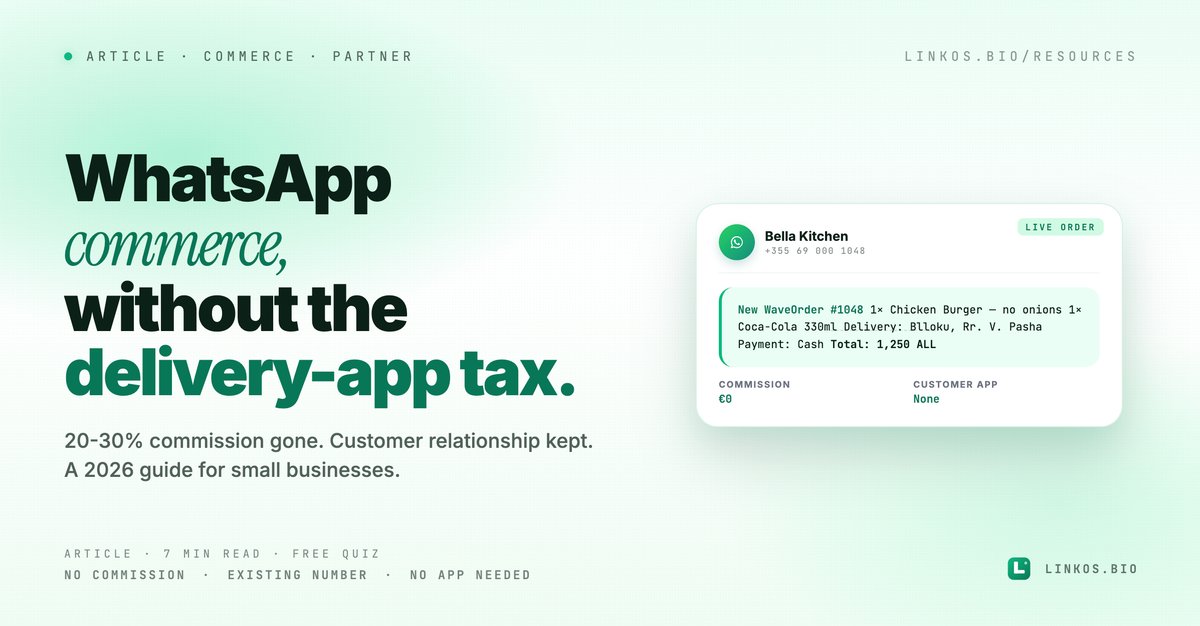
When a customer completes an order, the merchant should get a WhatsApp message that looks like:
New WaveOrder #1048
Customer: Arta K.
Phone: +355 69 000 1048
1× Chicken Burger — no onions
1× Coca-Cola 330ml
Delivery: Blloku, Rr. Vaso Pasha
Payment: Cash
Total: 1,250 ALL
Not "Hi, someone ordered, click here to see details." You should be able to read the order, copy the address, and start fulfilling without opening anything.
3. Customers don't need to download an app
This is the dealbreaker for 95% of customers. If your storefront requires a download, you've lost the impulse buyer. The catalog should open in any browser, work on any phone, and complete in <60 seconds from QR scan to confirmed order.
4. QR codes built in
QR is how WhatsApp commerce gets used in the physical world: stickers on restaurant tables, signs at retail counters, QR on package inserts for repeat orders. The tool should generate the QR, branded with your colors, ready to print.
5. Categories, variants, and add-ons
Real products have variations: sizes, colors, "with or without onions," delivery time slots. The catalog should support all of these without forcing you into a generic "name + price" structure.
6. Inventory + repeat-customer view
Even if you start with a basic plan, the tool should grow with you — inventory tracking so you stop selling out-of-stock items, customer records so you can broadcast a new drop to past buyers, basic order analytics so you know which days are busy.
A worked example: WaveOrder
We've been recommending WaveOrder — waveorder.app to small businesses in our network for exactly this use case. It hits all six requirements above and is one of the few tools that doesn't require WhatsApp Business API setup.
How WaveOrder maps to each requirement:
- Existing number: Yes — works with your personal WhatsApp number; no Business API required.
- Structured order message: Yes — the merchant gets a clean text block (see example above).
- No customer app: Yes — catalog opens in the browser, works on every phone.
- QR built in: Yes — generates branded QRs for tables, counters, packaging.
- Categories + variants: Yes — supports product categories, sizes, colors, add-ons, delivery time slots.
- Inventory + customers: Yes — stock tracking (toggle items on/off when out of stock), customer records, order history, and analytics. Higher tiers add deeper analytics + delivery scheduling + team roles.
WaveOrder pricing starts at $19/month (Starter, up to 50 products), with a 14-day free trial that doesn't require a credit card. Pro is $39/month and adds unlimited products, full analytics, delivery scheduling. Business is $79/month with custom domain + team accounts.
For a small restaurant doing 20 orders/day with €15 average order value, that's €9,000/month in revenue. A delivery app at 25% commission would take €2,250/month from that. WaveOrder takes €39/month. The math isn't subtle.
Try WaveOrder free for 14 days at waveorder.app →
(Full disclosure: WaveOrder is built by our extended team. We don't earn commission from signups — we're including them because the alternatives we've tested either charge transaction fees or require WhatsApp Business API setup we don't think small businesses should have to deal with.)
Is WaveOrder right for you? Quick FAQ
Is WaveOrder free? WaveOrder has a 14-day free trial (no credit card). After that, paid plans start at $19/month. There's no per-order commission on any plan.
Do I need WhatsApp Business API? No. WaveOrder is specifically designed to work with the personal WhatsApp number you already use. The catalog generates a wa.me link to your existing number — no business verification, no API setup, no number migration.
Do my customers need to download an app? No. The catalog opens in any browser. Customer scans QR or clicks a link → browses items → fills in delivery details → the order arrives in your WhatsApp. No app download required at any step.
Can I use it for restaurants AND retail AND services? Yes. The same catalog model works for restaurants (food items), retail (products with variants), Instagram sellers (drops + collections), and service businesses (appointments — services become "products" with duration as the variant).
What happens when I grow past the Starter plan limits? Starter caps at 50 products and 1 store. Pro lifts those to unlimited products + up to 5 stores. Business adds unlimited stores + team accounts + custom domain + API access. The product/store caps are the main upgrade triggers — you move up when you outgrow them.
Can I import my existing product list? Yes — CSV import is included on every plan, starting with Starter. You don't have to retype 200 products to migrate from another system.
What payment methods does WaveOrder support? WaveOrder's checkout is configured for cash on delivery, on pickup, or on service completion (depending on your business type). The customer's payment method is shown on the order message so you know what to expect; you arrange the actual payment directly with the customer — WaveOrder takes no commission on your sales. Card / online payments depend on your production setup; check the latest pricing page if that matters for your flow.
How to migrate without losing customers
Three steps, ~2 hours of work total:
Step 1: Build the catalog (60 min)
Add your top 20 products with prices, photos, and any required variants (sizes, etc.). You don't need to add all 200 products on day one — start with the bestsellers. Use WaveOrder's CSV import if you already have a list.
Step 2: Generate your link + QR (5 min)
Get the public catalog URL (waveorder.app/yourstore) and the QR code. Print a few QRs for tables / counter / package inserts.
Step 3: Soft-launch via WhatsApp broadcast (15 min)
Send a single message to your existing WhatsApp customer list:
"Hi! We're testing a new way to order — just tap this link, pick what you want, and your order will come straight to me on WhatsApp. Same number, same person — just less back-and-forth. Try it: [your-catalog-link]"
Then watch the first 5-10 orders come in. If anything looks weird in the order message, tweak the catalog. Most issues are caught in the first day.
After a week, you'll notice: customers who used to send 12 messages now send 2. Order details are consistent. You stop missing items because the catalog is the source of truth.
More on building a small-business presence customers actually trust
Catalog + WhatsApp solves the ordering problem. The other half is the bio page that funnels strangers TO your catalog. A clean Linkos bio with your WaveOrder catalog as the top link converts noticeably better than a raw waveorder.app/yourstore URL pasted into Instagram bio:
Try the tool
Open the qr code tool — free, no signup
Related resource
Download / open: custom-domain-setup-guide
Try the alternative: WaveOrder at waveorder.app — WhatsApp commerce that works with your existing number, no commission, 14-day free trial.
Quick quiz: which selling model fits your business?
Pop quiz · 5 questions · ~60 seconds
Which selling model fits your business?
Answer 5 multiple-choice questions. See your tier at the end. Bragging rights optional.
Sign up to start earning XP for every read.
📗 Free: the Link-in-Bio Starter Kit
The checklist, 6 layout templates, and our 1-page cheat sheet — sent straight to your inbox.